I went through 8 years of my career in networking without having to know a thing about multicast. I was first exposed when onboarding network requirements for IPTV on hospitality networks. Currently I support wireless clients that use multicast to send audio to multiple recipients. Oftentimes I am asking customers to take packet captures for evaluation of VoIP audio streams. In order to properly navigate and analyze these captures I’ve learned to identify the different delivery mechanisms that can be used over 802.11
Standard 802.11 multicast
Standard wireless multicast (and broadcast) delivery is delivered all at once at specific times to the BSS. Any multicast frames destined to clients on the BSS will be buffered and then sent all at once @ the DTIM. The DTIM is a configured parameter on the SSID that specifies the number of beacon intervals between multicast and broadcast delivery to the BSS.
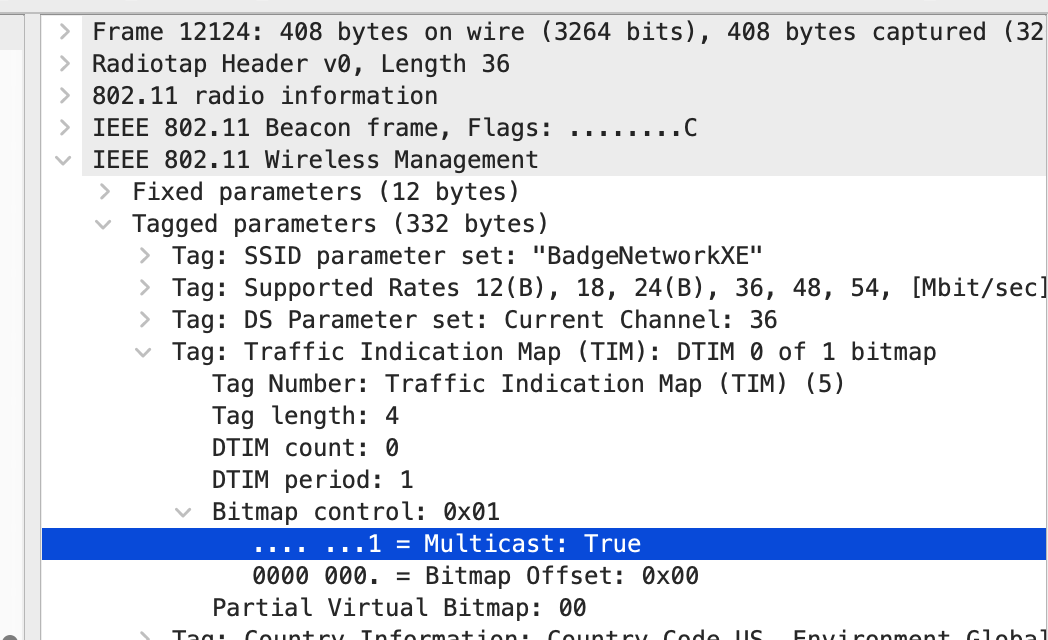
Wireless stations within a BSS will inspect Beacon frames to determine the DTIM interval. Now stations will know when to wake up from power save to check beacons for if multicast / broadcast is present. they will then know if multicast is buffered by checking the first bit of the Bitmap Control Field within the TIM section of the Beacon. When this is set to 1 (true), broadcast and / or multicast will immediately follow so that stations will stay awake to receive it.
Standard 802.11 multicast frames will have a Receiver Address and Destination Address of the multicast group. All multicast frames, whether 802.11 or 802.3, will have a common OUI of 01:00:5e. for their destination address. The Transmitter Address will be the Access Point BSSID and the Source Address will be the source of the multicast stream on that VLAN (could be multicast server, could be local default gateway).
Here is a capture of standard 802.11 multicast delivery of downstream audio. Notice the beacon frame is followed by multicast traffic delivered all at once (Delta between frames is ~0). Also notice that wlan.da is the multicast mac address corresponding to the destination multicast IPv4 group 230.230.0.1 .

Taking a closer look at the beacon, we see the Bitmap Control Field of the Traffic Indication Map IE is set to Multicast ‘True’. This informs stations expecting multicast to stay awake for traffic to follow.
Taking a closer look at the downstream traffic we see basic rates being used with the OFDM PHY (802.11a). We also see the frames are regular Data Frames (not QoS).

Wireless Multicast to Unicast Conversion
I choose my words carefully when describing this feature. It is often confused with Cisco Wireless AP / CAPWAP Multicast Mode which is a different subject entirely, but I digress . . .
Why convert multicast to unicast?
- Standard 802.11 multicast frames are transmitted as regular data frames, not QoS data frames.
- Standard 802.11 multicast frames are transmitted at the lowest supported legacy data rates. 802.11b/g/a, not at MCS rates.
- Standard 802.11 multicast frames are transmitted without Layer 2 acknowledgements
Unicast frames give us QoS, MCS, and L2 Acks. The AP / WLC keeps an IGMP snooping table of which stations within the BSS are subscribed to specific multicast groups. The AP then receives a multicast stream from the LAN and converts the stream to unicast. These unicast frames have Destination Address and Receiver Address of the destination station – not the multicast group. The Transmitter Address will be the Access Point BSSID and the Source Address will be the source of the multicast stream on that VLAN (could be multicast server, could be local default gateway).
Here is a capture of wireless multicast to unicast conversion. Notice how multicast traffic with destination group 230.230.0.22 in the same BSS (same Mist AP wlan.sa) is being sent to directly to two different hosts (wlan.da) via unicast.

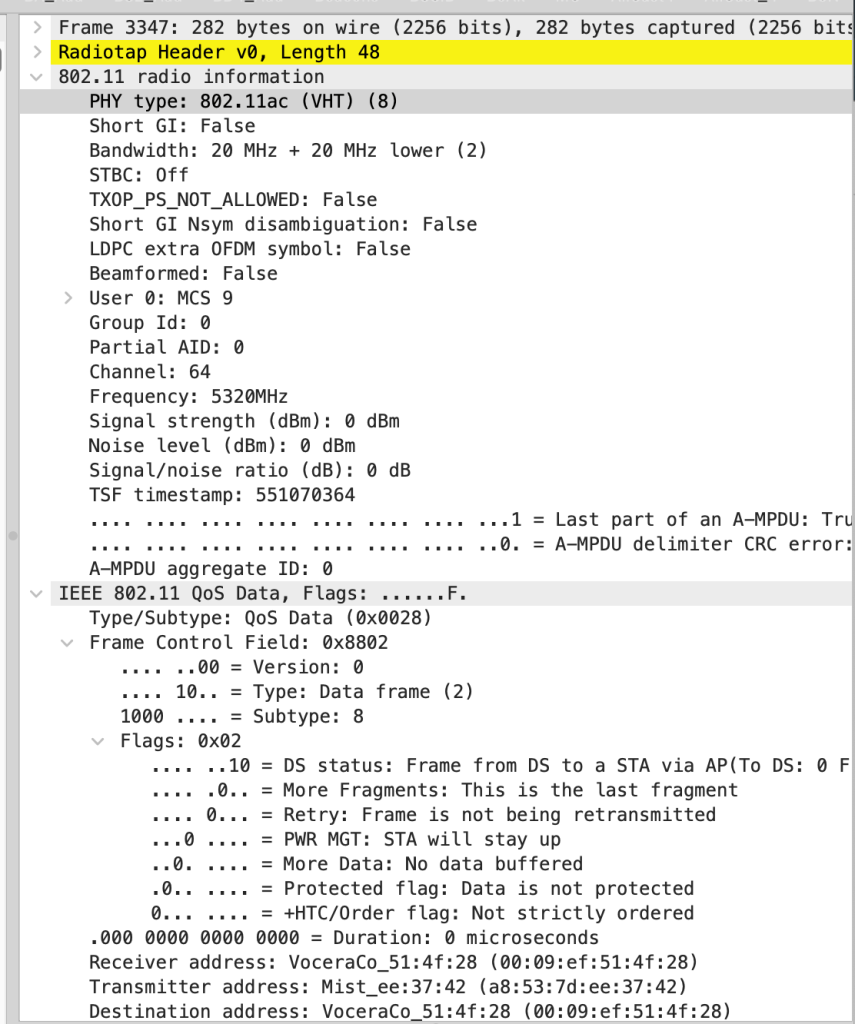
Taking a closer look at one of these downstream frames we see MCS 9 being used with the VHT PHY (802.11ac). We also notice the frames are QoS Data Frames.
 The Information Element